How to Reduce Fleet Mileage: 6 Practical Tips for Businesses


You can reduce fleet mileage by cutting out trips your business does not need. Better planning can help your team drive fewer miles and spend less time on the road.
Extra trips can soon add up. A driver may return to the depot for a tool. Another might cross town twice to visit nearby customers.
However, small changes can help you avoid these journeys. Here are six ways to review your fleet’s trips and make better use of each vehicle.
1. Review journeys to reduce fleet mileage
First, look at a normal working week. Check the routes your drivers took and compare them with the jobs they completed.
Look for patterns such as:
- Two vans visiting the same area.
- Drivers going back to the depot between jobs.
- Repeat trips to the same customer.
- Routes that involve driving back and forth.
Then, speak to your drivers about what you find. There may be a good reason for an extra trip.
For example, a customer may have changed their booking. A driver might also have needed a part that was not in stock.
Once you know the cause, you can look for a way to prevent the same issue.
2. Cut unnecessary miles by booking nearby jobs together
Next, check how you book customer visits.
If you book each job into the first free slot, drivers may travel across the same area several times. Instead, try to group nearby jobs together.
For example, a repair team could visit customers in one part of town in the morning. They could then move to another area after lunch.
This can help reduce fleet mileage without cutting the number of jobs you complete.
However, leave room for delays and urgent calls. Some jobs will take longer than planned, so drivers need a realistic schedule.
3. Send a suitable nearby driver
When an urgent job comes in, check which vehicles are close to the customer.
Your usual driver for that area may be much further away. As a result, sending them could add miles that another team member could avoid.
SATMO’s find-nearest feature helps you find vehicles near a location.
Before you assign the job, check that the driver:
- Has time to attend.
- Has the right skills.
- Carries the tools and parts needed.
- Has a suitable vehicle for the work.
For instance, a nearby engineer with the right part may be able to help. This could save another driver a trip from the depot.
4. Reduce fleet mileage with better preparation
Some extra journeys begin with a missed check before a van leaves the yard.
A missing tool or wrong part can force a driver to turn back. In turn, this can delay the rest of the day’s work.
To help avoid this, use a short checklist before each shift:
- Check the customer’s address.
- Confirm which tools and parts are needed.
- Load the items required for each job.
- Check site access and parking details.
- Make sure the driver has clear job notes.
If drivers often return for the same item, find out why. For example, you may need to change how you check stock or prepare job sheets.
Fixing the cause can help reduce fleet mileage week after week.
5. Ask whether each trip is needed
Before you book a visit, check whether a call or photo could help.
For example, a customer may be able to send a photo of a broken part. Your team can then check what is needed before they travel.
The visit may still need to go ahead. Even so, better details could help your driver bring the right part first time.
In some cases, a phone or video call may resolve the issue without a trip.
For more advice, read the Health and Safety Executive’s guide to planning and managing work journeys.
Also, remember that the shortest route is not always the best choice. Check road conditions, vehicle access and safe places to stop when planning a journey.
6. Compare miles with the work done
Finally, check whether your changes are helping.
A fall in mileage may look good. However, it could simply mean your team had fewer jobs that week.
Instead, compare the miles driven with the work completed. You could track:
- Miles driven per job.
- Trips back to the depot.
- Repeat visits due to missing parts.
- Time spent driving between jobs.
Try to compare weeks with a similar workload. For example, a week of local visits will differ from one with jobs further away.
Start with one change, then review the result. This makes it easier to see what helped.
How vehicle tracking helps reduce fleet mileage
Vehicle tracking gives you a clearer view of your fleet’s journeys.
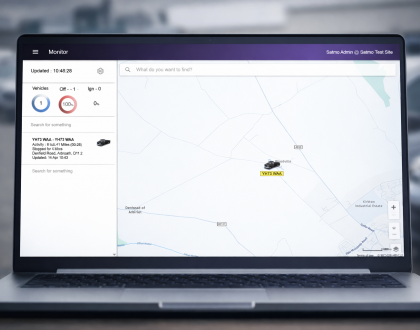
With SATMO, you can view live vehicle locations and look back at recorded routes, stops and journey times. You can also use the find-nearest feature when you need to assign a job.
Then, compare this information with your job records. Look for trips you could avoid through better planning or preparation.
The data alone will not cut your mileage. However, it can help you decide what to change.
Explore our vehicle tracking features to find out more.
You can also read our guide to vehicle tracking for small businesses for a wider look at how tracking can help.
Frequently asked questions
Can a small fleet cut unnecessary mileage?
Yes. Even a few vans can make trips that better planning could avoid.
First, review one week of journeys. Then, choose one issue to work on, such as repeat visits or trips for missing tools.
Does vehicle tracking cut fuel costs on its own?
No. Tracking helps you see where your vehicles travel.
You then need to use that information to make changes. Any savings will depend on the trips you avoid and how your vehicles are used.
Should every driver have the same mileage target?
Drivers may cover different areas and carry out different work. Therefore, one target may not suit them all.
Compare similar jobs and speak to your team before setting goals. Also, allow enough time for safe driving, breaks and customer visits.
Reduce fleet mileage with SATMO
To reduce fleet mileage, start by checking which trips your team needs to make. Then, look for journeys you could avoid with better planning.
SATMO can help you review vehicle activity and choose tracking features that suit your business.
Contact SATMO to book a live demo or call 01274 587748.