Features review – activity page add-ons


by Fiona Taylor
What other features can you use?
There are a number of features on the Satmo vehicle tracking system that you can make use of – but do you know where they all are? The activity page has a number of hidden features.
When you had your vehicle tracking system fitted, you would have had the option for a free to you training session. It may have been a long time since you had this, so here is a quick reminder of the extra features on your vehicle tracking activity page.

The menu bar at the top of your Satmo vehicle tracking system gives you access to a number of pages, let’s have a look at the activity page today.
Activity page
Your activity page will show you each trip that the vehicle has made. You will see;

- trip start and end time
- location of the start and end of each trip
- speeds travelled
- routes taken
but your activity page has more than this. Let’s take a look at what else you can do.

The layout menu allows you to change how you see the page so you can view it in a detailed way if you like to see all the information. If you prefer less clutter, then the clean layout might be better for you. Less information, just key pieces available when you need them.
What other features are on your activity page?
Above the activity you will see a further menu.

Here you can get more information;
- Activity – shows you all of the days trips in one place
- Timeline – allows you to see every start, stop and idling in a list form
- POD – allows you to collect a signature as proof of a delivery
- Garmin trips and routing – here you can link a Garmin sat nav to your trackers
- Documents – here you can see any stored documents against the vehicle, eg drivers license or fines
- Vehicle checks – here you can if there are any issues with the daily vehicles checks that need to be completed for certain companies
- Calendar – allows you to store holidays and time off so you know why the vehicle wasn’t used
- Reports – here you can have access to some of the reports for the vehicle
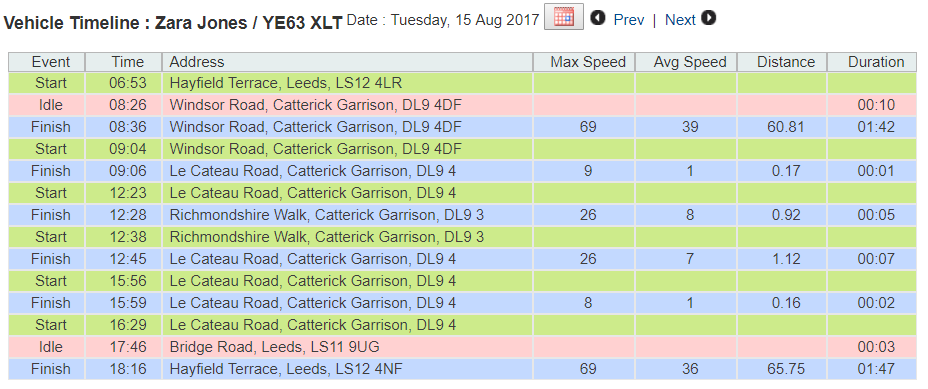
This is how the timeline view displays the days activity – see how the idling is highlighted.
Do you need more training?
If you feel like you would benefit from some more training then give the team a call on 01274 587748 and one of us will be happy to arrange something for you.
Fiona Taylor
Fiona Taylor is the Sales Manager at award winning Satmo Vehicle Tracking. If you feel you need help with your fleet, want to gain back control, save some money and time then please get in touch.